Manage URL Normalization in the Cloudflare dashboard
Use the Rules app in the Cloudflare dashboard to control URL Normalization settings.
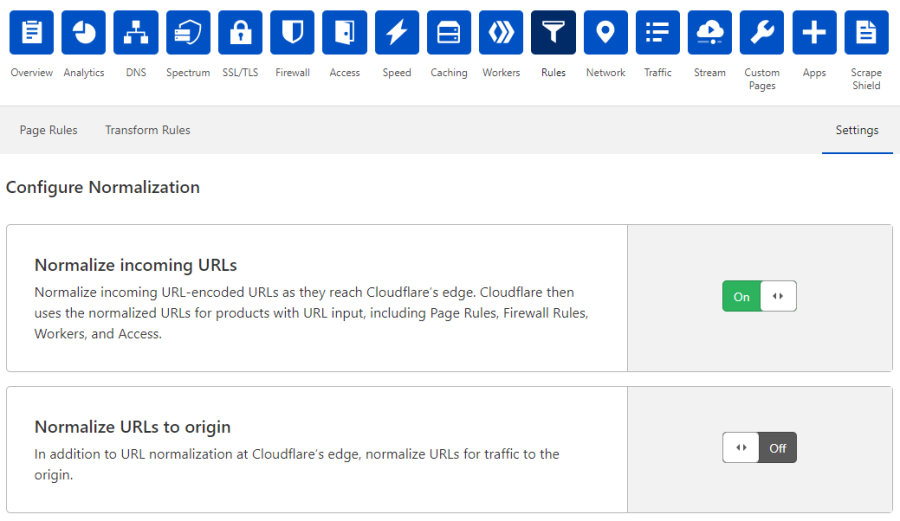
Do the following:
Log in to the Cloudflare dashboard.
Select the Websites tab and choose the site for which you want to configure URL Normalization.
Click the Rules tile in the app bar, and then click the Settings tab.
Under Configure Normalization, enable or disable the available URL Normalization settings .
Available settings
The Cloudflare dashboard provides two components to manage URL Normalization:
Normalize incoming URLs - Configures the URLs of all incoming traffic to Cloudflare:
- When set to On (default), all incoming URLs are normalized before they pass to subsequent Cloudflare features that can receive a URL as input, such as Page Rules, Firewall Rules, Workers and Access.
- When set to Off, incoming URLs are not normalized before passing to subsequent Cloudflare features.
Normalize URLs to origin - Configures URLs that are sent to the origin:
When set to On, requests sent to the origin are normalized.
When set to Off (default), requests sent to the origin are not modified.
The table below shows how URL Normalization settings affect incoming URLs before they pass to other Cloudflare features and to origin.
| Incoming URL | Normalize incoming URLs | Normalize URLs to origin | URL passed to Cloudflare edge | URL passed to origin |
|---|---|---|---|---|
www.example.com/hello | On | Off | www.example.com/hello | www.example.com/hello |
www.example.com/hello | On | On | www.example.com/hello | www.example.com/hello |
www.example.com/hello | Off | Off | www.example.com/hello | www.example.com/hello |
www.example.com/%68ello | On | Off | www.example.com/hello | www.example.com/%68ello |
www.example.com/%68ello | On | On | www.example.com/hello | www.example.com/hello |
www.example.com/%68ello | Off | Off | www.example.com/%68ello | www.example.com/%68ello |